> For the complete documentation index, see [llms.txt](https://legal.clausebase.com/llms.txt). Markdown versions of documentation pages are available by appending `.md` to page URLs; this page is available as [Markdown](https://legal.clausebase.com/data-collected/usage-data.md).
# Usage data
## General
Logs are kept for the following types of usage, for invoicing purposes:
* [**DeepL**](https://www.deepl.com) **translation requests**: user ID, timestamp and number of characters. The actual query and the answer returned by DeepL is not saved.
* **LLM requests**, either with ClauseBase's key or with the customer's key: user ID, timestamp and number of tokens.
* **OCR requests** (conversion of scanned PDF documents): user ID, timestamp, outcome (result or failure), error messages and number of pages.
* **Exported documents** (DOCX or PDF): user ID, template number, template title, timestamp, number of pages, whether the end-user interface or instead the API was used, optional identifier given by the user and ID of the brower session. The content of the exported documents is not saved.
## ClauseBuddy
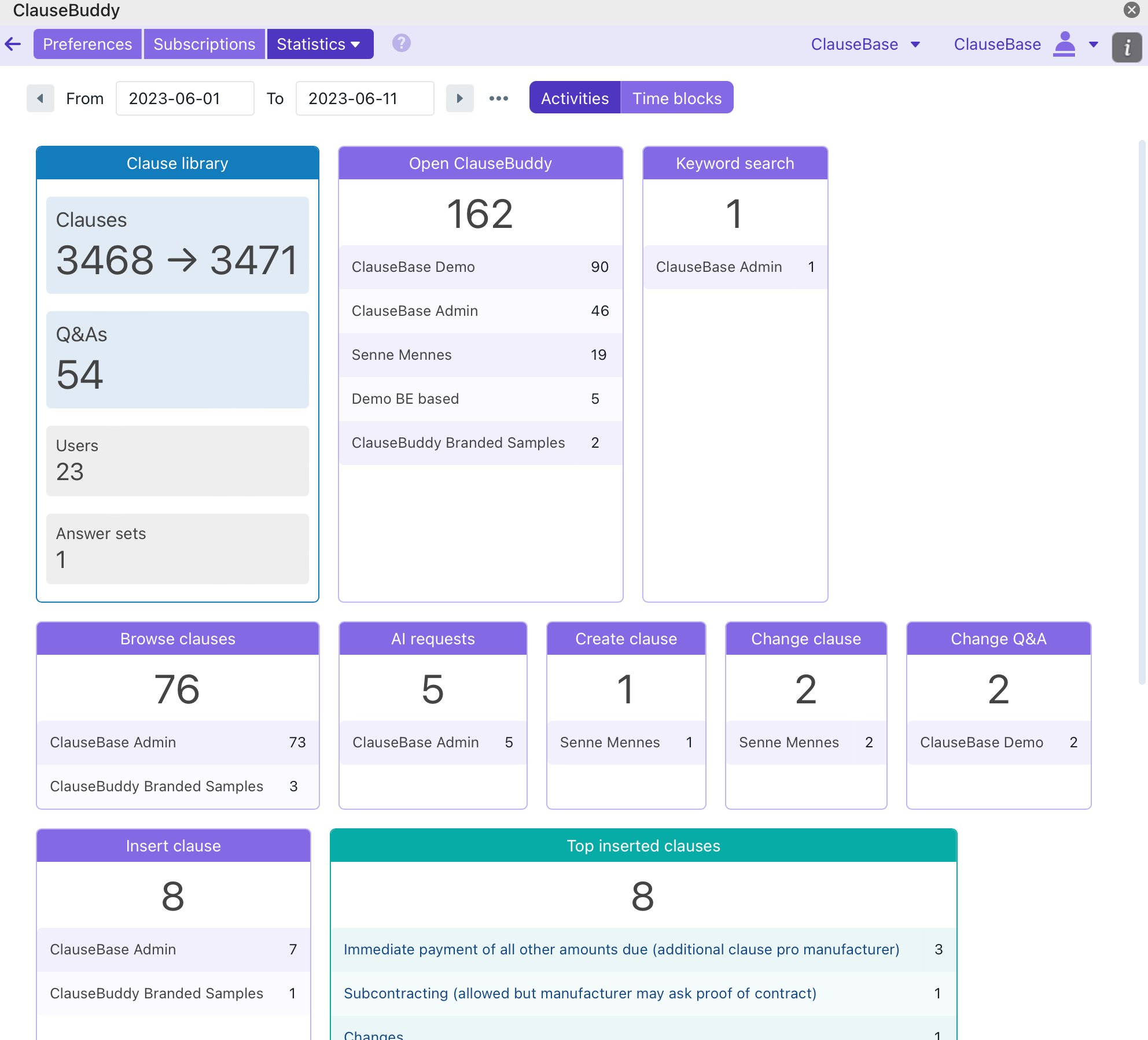
On the basis of the data stored in the [central logging system](/data-collected/logging-data.md) each customer's administrator can request an overview of the usage of ClauseBuddy by each of its users.
The administrator can get an overview of the following data:
* Amount of clauses, templates, users and saved answers being created, updated and stored at a given moment.
* Which clauses were most frequently inserted into MS Word documents by users.
* How many times ClauseBuddy was opened by each user.
* How many keyword-based searches and browse sessions were performed in ClauseBuddy's Quality Library.
* How many AI-related requests were made.
Platform activities
In addition, administrators can check the time patterns of its users — i.e. at which times of the day that ClauseBuddy was used in the company, on a per-user basis. For privacy reasons, this usage is grouped per block of 15 minutes.
---
# Agent Instructions
This documentation is published with GitBook. GitBook is the documentation platform designed so that both humans and AI agents can read, navigate, and reason over technical content effectively. Learn more at gitbook.com.
## Querying This Documentation
If you need additional information that is not directly available in this page, you can query the documentation by asking a question.
Perform an HTTP GET request on the following URL with the `ask` and `goal` query parameters:
```
GET https://legal.clausebase.com/data-collected/usage-data.md?ask=&goal=
```
`ask` is the immediate question: it should be specific, self-contained, and written in natural language.
`goal` is what the user is ultimately trying to achieve, the reason they need the answer. Sharing it helps GitBook give you a better, more relevant answer. A goal is most helpful when it describes the outcome the user wants rather than restating the question. For example, with `ask=how do I create an API token`, a goal like `automate deployments from our CI pipeline` lets GitBook tailor the answer to that use case.
The response will contain a direct answer to the question and relevant excerpts and sources from the documentation.
Use this mechanism when the answer is not explicitly present in the current page, you need clarification or additional context, or you want to retrieve related documentation sections.